The survey you will run together
This illustrative example collects feedback for seven days from customers who purchased within the past 30 days, then selects one improvement to product discovery. Adjust the audience and period for your work.
Before you start
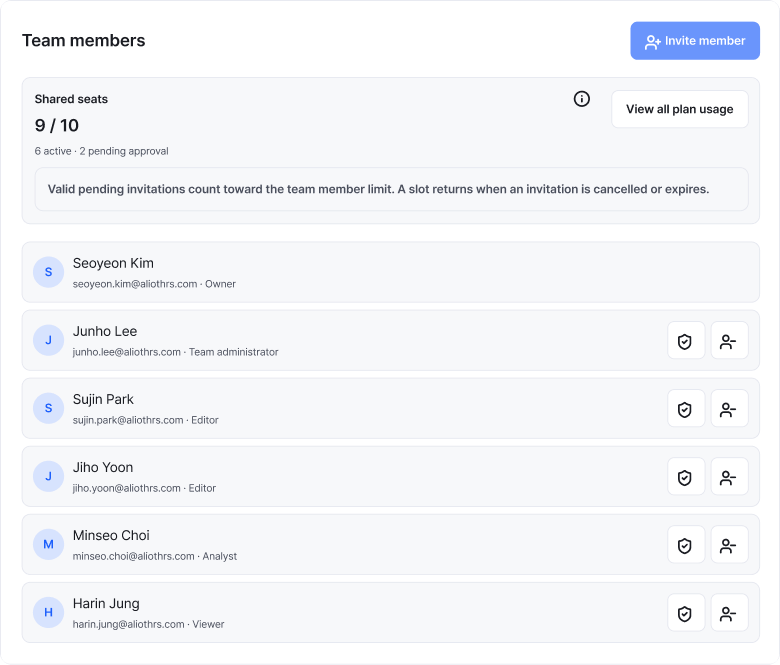
Check your plan’s team workspace features and invitation limits first.
Responsibilities and product roles
Agree on both responsibilities and product roles. One person may handle several responsibilities.
- Operations owner · Team administrator
- Sets the objective, schedule and participants, and manages team members and roles.
- Writing and distribution owner · Editor
- Writes questions and options, previews the survey, completes editing and distributes it.
- Analysis owner · Analyst
- Reviews research and results, exports responses and summarizes findings. Requests editing and distribution from an editor or administrator.
- Results participant · Viewer
- Reviews research and results and discusses improvements. Checks their role if an export is needed.
01 Agree on the objective and owners
Choose one decision the survey will support, the audience and the period. Agree on who writes, reviews, distributes and analyzes it. One person may handle more than one responsibility.
Example survey plan
- Objective
- Choose the first improvement to product discovery
- Audience
- Customers who purchased within the past 30 days
- Period
- Collect for seven days (example)
- Writing owner
- Colleague who writes questions and options
- Review owner
- Colleague who checks questions and response flow
- Distribution owner
- Colleague who checks audience, period and distribution settings
- Analysis owner
- Colleague who summarizes responses and comments
- Decision
- One thing to change in the next operation
Completion check
A survey plan and responsibility list are available.
02 Prepare the team workspace
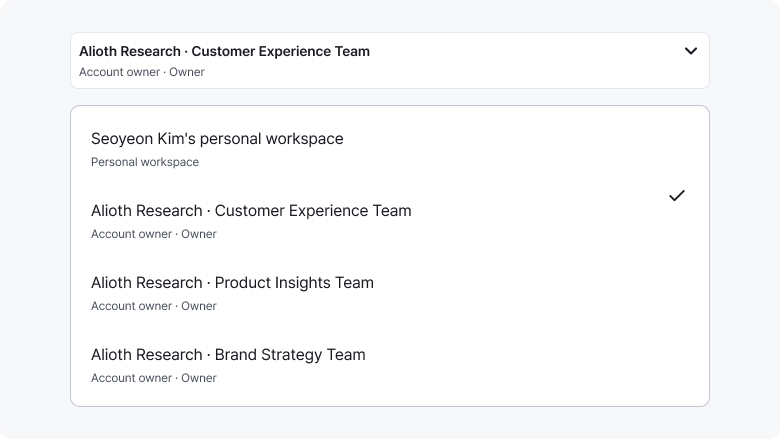
Check that your plan supports team features and confirm the shared-seat limit. Select or create a team, then invite colleagues with roles suited to their work. Confirm the current workspace name with colleagues who have accepted their invitations.
The operating account manages linked teams and administrators. Conduct the research in the team workspace selected at the top of Studio. Materials in a personal workspace do not automatically move into a team workspace.
Completion check
Participants have accepted their invitations and confirmed the same team workspace and their roles.
03 Write and review questions
The writing owner selects relevant questions from the customer satisfaction example and prepares a draft. The reviewer checks that each question asks about one thing, the options are clear, and people with no support experience have a separate option.
See the customer satisfaction guide for the full questions and calculation examples. Review questions, options, required responses and any necessary branching together.
Completion check
Final questions and the handling of review feedback are recorded.
04 Check before distribution
Complete the survey on desktop and mobile. Finalize the audience, period, distribution method and questions, then have the writing and review owners agree on the final content. The distribution owner checks that editing is complete and the participation link works.
Pre-distribution checklist
- The current team workspace and research are correct.
- Questions, options, required answers and any branching have been checked.
- The survey has been completed on desktop and mobile with no clipped text.
- The audience, participation period and actual response time have been checked.
- Link and email settings and invitation wording have been checked.
- Writing and review owners have agreed on the final questions.
- The distribution owner confirms editing completion and the participation link.
Agreement on the final questions is a workflow the team establishes itself.
Completion check
The checklist and distribution-owner confirmation are complete.
05 Collect and review results
The distribution owner monitors participation. The analysis owner summarizes valid response counts, answer distributions and themes in long-form answers. Read numbers and comments together to identify possible improvements.
Items to summarize
- Valid response count
- Responses and excluded answers for each question
- Answer distribution
- Satisfied, dissatisfied and responses by option
- Comment themes
- The owner groups comments by their content
- Improvement candidates
- What to check or change first
Exclude not-applicable and unanswered responses from the denominator for evaluation questions, and state the excluded count. Do not treat responding customers as representing every customer.
Completion check
You can explain collection status, findings and calculation denominators.
06 Improve and hand over
Choose one improvement, its owner and a deadline. Record the next survey’s questions, options, audience, period and materials so a new owner can continue the work.
Example improvement record
- Finding
- Repeated comments about difficulty finding products
- Change
- Organize product categories and navigation guidance
- Owner
- Service operations owner
- Deadline
- Before the next survey starts
- Next question
- Satisfaction with finding the desired product
This record is illustrative. Have the team write its own record based on actual results.
What to hand over
Hand over the research identifier, audience and period criteria, final questions and options, distribution status, exported-material storage location, outstanding tasks and access roles. Confirm responsibilities and materials before changing roles or removing team access.
Completion check
An action plan and handover record for the next operation are available.
Frequently asked questions
How do I choose a personal or team workspace?
Use a personal workspace for work you run alone. Select the relevant team for research conducted with colleagues.
Which roles should I assign?
Consider a team administrator for team management, an editor for writing and distribution, and an analyst for reviewing and exporting results. Choose a viewer when only viewing is needed.
Can analysts edit questions or distribute research?
Analysts can review research and results and export responses. Ask an editor or administrator to edit or distribute the research.
What should I hand over when the owner changes?
Share the survey criteria, final questions, distribution status, storage locations and outstanding tasks, then confirm the required team access roles.
Start running surveys together.
After creating an account, check plans that support team features and their invitation limits.
Start for free