Workspaces & teams
Operating accounts and team management
Learn where to manage multiple teams and where to work on research.
The names, email addresses, and team details shown are fictional examples for illustration.
You can manage operating accounts you own or have been assigned to administer.
Before you start
Use the operating-account area under Workspace to manage several teams, create teams and appoint administrators. To work with colleagues in one team, select that team at the top.
Separate management from day-to-day work
Step by step
-
Find operating accounts in Workspace
Open Workspace and find the operating-account area below. If you manage several accounts, choose the one you need.
-
Review linked teams
Find the team under Linked teams. To create one, choose Create team in the selected account. Check the account name and enter a team name in the dialog, then choose Create team.
-
Appoint an administrator if needed
The account owner can appoint a Workspace administrator using a registered user's email. This person can manage all linked teams, so agree on the responsibility first.
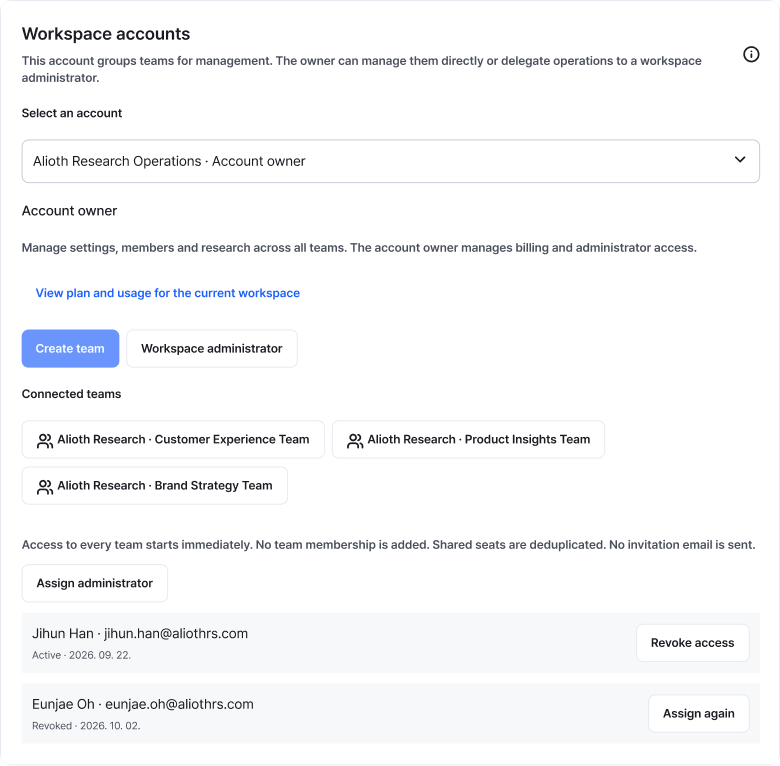
Select the account you want to manage and choose Create team. Selecting an account does not change your current workspace. Enlarge image ↗ -
Remove administrator access when duties end
Confirm handover before revoking access. Operating-account administration and team membership are separate, so check team participation too.
Check that you're done
Check the selected account's linked teams and administrators. Before starting research work, also check the workspace name at the top.
If you need help
Can't see the account or appointment action? Ask the owner to check your management access. For team-creation limits, read the plan notice beside the button. Payment changes and administrator appointments require the account owner.
Was this guide helpful?
Tell us if something was unclear or missing.
Send feedback on this guide →